
A remote site may need WiFi for workers, cameras, payment terminals, IoT gateways, tablets, laptops, industrial equipment, or guest access.
The common response is to start shopping for a “long-range WiFi antenna.”
But there is an earlier question:
Where does the internet come from?
A remote WiFi network has at least two different communication layers.
The first is the backhaul that brings connectivity to the site.
The second is the local WiFi network that distributes that connectivity around the site.
These functions should not be confused.
A Starlink terminal can bring internet to a remote building, but it does not automatically guarantee reliable WiFi across a 20-hectare site.
A 5G router may have excellent cellular connectivity but poor local WiFi coverage.
A fiber connection may deliver gigabit service to a control room while devices 300 meters away cannot connect at all.
A good remote area WiFi backhaul design therefore separates these two problems before selecting antennas.
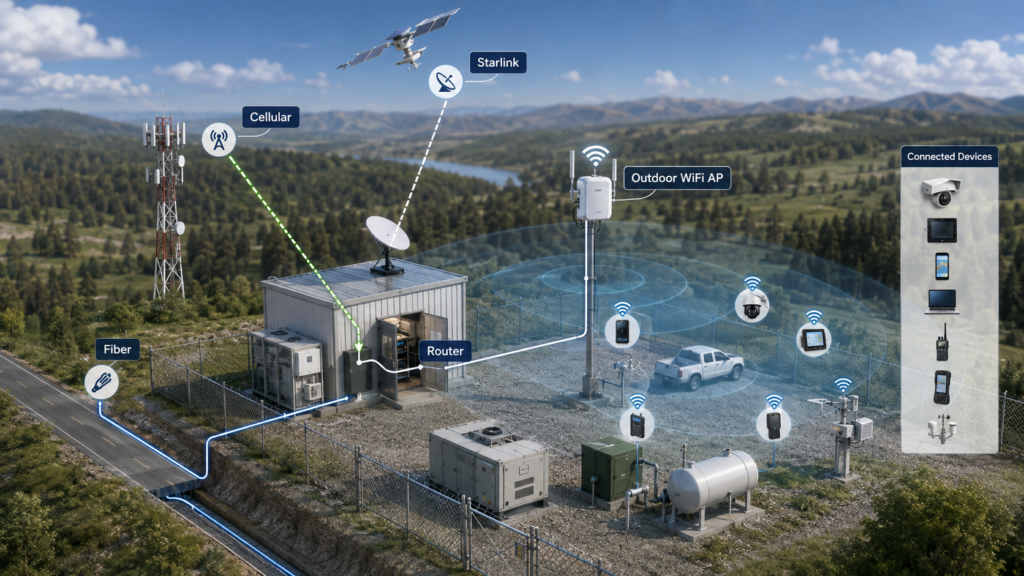
1. Understand the Complete Network Architecture
A simple remote-site network can be represented as:
Internet Source → WAN Gateway/Router → Local Network → WiFi AP → WiFi Antenna → Client Devices
The internet source may be:
- fiber;
- Ethernet from another building;
- 4G LTE;
- 5G;
- fixed wireless access;
- Starlink or another satellite service;
- point-to-point wireless backhaul.
The local WiFi system then provides connectivity to devices around the site.
This distinction matters because different antennas may be required for each side.
For example, a remote site using 5G may contain:
- a cellular antenna aimed at or communicating with the mobile network;
- a cellular CPE/router;
- an Ethernet network;
- outdoor WiFi APs;
- separate 2.4/5 GHz WiFi antennas.
The cellular antenna and WiFi antenna solve different RF problems.
2. Option One: Fiber Backhaul
If fiber is already available at the required location, it is usually an attractive primary backhaul because it can provide high capacity without depending on local wireless propagation between the site and a mobile base station.
However, “fiber exists somewhere on the property” is not the same as “the entire property has WiFi.”
Imagine fiber terminating inside an office at one edge of a large farm or industrial site.
The network still needs to reach:
- a warehouse;
- outdoor cameras;
- staff areas;
- gates;
- machinery;
- remote buildings;
- IoT equipment.
From the fiber termination point, the designer may use Ethernet, additional fiber, point-to-point wireless bridges, or distributed APs.
Fiber solves the upstream connectivity problem.
It does not eliminate the need for WiFi coverage engineering.
Fiber is especially attractive when:
- infrastructure already exists;
- high capacity is required;
- many users are active simultaneously;
- stable upstream bandwidth is important;
- underground or overhead cable installation is practical.
Fiber may become more difficult when:
- the site is very remote;
- trenching is expensive;
- roads or rivers must be crossed;
- the site is temporary;
- buildings are widely separated.
The correct choice is project-specific.
3. Option Two: Cellular 4G or 5G Backhaul
4G and 5G can provide a practical backhaul where wired infrastructure is unavailable.
GSMA describes fixed wireless access as a wireless alternative for delivering broadband connectivity to fixed or nomadic locations, particularly where conventional wireline infrastructure may be difficult or uneconomic to deploy.
For a remote site, a cellular CPE or industrial router can receive the mobile network and then provide Ethernet to the local WiFi system.
But the cellular link must first work reliably.
This introduces another RF planning problem.
4. Do Not Evaluate Cellular Backhaul Only by the Nearest Tower Distance
Customers often ask:
“The nearest tower is five kilometers away. Will it work?”
Distance is important, but it is not enough.
A cellular link also depends on:
- terrain;
- elevation;
- line-of-sight conditions;
- trees;
- buildings;
- operating frequency;
- carrier configuration;
- tower sector direction;
- network loading;
- CPE modem capability;
- antenna gain;
- MIMO configuration;
- cable loss;
- installation height.
A tower that is geographically closer may not necessarily be the best serving cell.
The site may be behind a hill relative to that tower.
Another tower slightly farther away may provide a cleaner path.
The network operator may also use different frequency bands at different sites.
Therefore a proper survey should check actual cellular measurements rather than using map distance alone.
Useful measurements may include:
- RSRP;
- RSRQ;
- SINR;
- serving cell information;
- frequency band;
- upload and download throughput;
- performance at different antenna positions.
5. Indoor Cellular Router or Outdoor CPE?
If the site has strong cellular coverage, an indoor router may be sufficient.
But weak-signal locations often benefit from moving the cellular receiving system toward a better RF position.
Possible approaches include:
- indoor router with external cellular antennas;
- outdoor CPE;
- rooftop cellular antenna;
- directional cellular antenna aimed toward a known serving area;
- MIMO antenna system.
The exact antenna architecture depends on the cellular bands, modem configuration and network.
An important rule is to avoid moving a good antenna high on a roof and then connecting it to the modem through unnecessarily long high-loss coaxial cables.
Sometimes placing the entire CPE outdoors and extending Ethernet is more efficient.
6. Option Three: Starlink or Satellite Backhaul
Satellite broadband creates another useful option for remote locations where terrestrial infrastructure is limited.
Starlink’s current fixed-site business service explicitly targets remote sites and states that its terminal requires a sufficiently unobstructed view of the sky.
This creates a different planning requirement from cellular.
For cellular, the installation is concerned with the path toward terrestrial network infrastructure.
For Starlink, the terminal needs a suitable view of the sky according to the service’s installation requirements.
Once connectivity reaches the router, the local WiFi problem begins.
This distinction is critical:
Starlink is a backhaul solution. It is not automatically a site-wide WiFi coverage system.
A Starlink router inside one building may serve that building adequately while cameras, cabins, machinery or users farther away still require outdoor APs or additional network distribution.
A typical architecture may be:
Starlink Terminal → Router/Firewall → Ethernet/PoE Network → Outdoor APs → WiFi Clients
For a large site, several APs may be connected through fiber, Ethernet or wireless point-to-point links.
7. Fiber vs Cellular vs Starlink: What Changes?
| Backhaul | Main advantage | Main RF/infrastructure concern | Local WiFi still required? |
|---|---|---|---|
| Fiber | High-capacity wired backhaul | Physical cable availability | Yes |
| 4G/5G | Fast deployment where mobile coverage exists | Cellular signal, tower geometry, bands | Yes |
| Starlink | Useful for many remote locations | Clear sky and service availability | Yes |
| Point-to-point wireless | Connects two known fixed locations | LOS, alignment and interference | Usually |
The key lesson is simple:
Choose the backhaul according to how the site can reach the internet. Choose the WiFi antenna according to how users are distributed inside the site.
Those are different decisions.
8. What If Cellular Is the Only Available Internet Source?
This is a common rural and industrial scenario.
Before designing the WiFi coverage layer, first optimize the cellular side.
A useful workflow is:
Step 1: Identify Available Carriers
Determine which operators have service near the site.
Step 2: Measure at Ground Level
Establish a baseline.
Step 3: Measure at Better Heights and Positions
Try roof level or an outdoor mast where safe and practical.
Step 4: Identify the Serving Band and Cell
Do not judge only by signal bars.
Step 5: Test Real Throughput
Test uplink as well as downlink.
Remote monitoring and cameras may create significant upstream traffic.
Step 6: Choose the Cellular Antenna
If the serving direction is known and stable, a directional antenna may help in some cases.
If multiple serving cells are useful or direction varies, an omnidirectional architecture may be more appropriate.
Step 7: Only Then Design the WiFi Layer
Once reliable WAN connectivity reaches the router, distribute it through appropriately positioned APs.
9. The Best Cellular Antenna Is Not the Best WiFi Antenna
This is another common source of confusion.
A cellular router may support frequency bands from below 1 GHz through several GHz depending on the modem and region.
WiFi commonly operates in 2.4 GHz, 5 GHz and, for applicable equipment and regions, 6 GHz spectrum.
The antenna designs are not automatically interchangeable.
A cellular antenna must support the cellular radio system.
A WiFi antenna must support the AP’s WiFi bands and radiation requirements.
If one device contains both cellular and WiFi, the design may require several separate antenna elements with appropriate isolation.
For integrated gateways and CPE products, RFLink’s custom antenna solutions can address multiple antenna systems where enclosure layout, internal metal, cable routing and isolation influence performance.
10. Local WiFi Coverage Still Starts With the Area
Once the internet reaches the site, return to the local coverage question.
Suppose Starlink is installed on the roof of a farm office.
The WiFi clients are:
- staff phones around the office;
- cameras at three gates;
- tablets inside a workshop;
- a payment terminal at a visitor area;
- an IoT gateway near a field;
- staff accommodation 200 meters away.
One centrally located indoor router is unlikely to represent the optimal RF position for every device.
The network might instead use:
- an indoor AP for the office;
- an outdoor omnidirectional AP for nearby yard coverage;
- a sector AP toward a defined work zone;
- point-to-point links toward distant buildings;
- additional APs at remote structures.
The correct topology follows client distribution.
11. Consider Redundant Backhaul for Critical Sites
Some sites cannot tolerate a complete internet outage.
Examples include:
- security systems;
- industrial monitoring;
- remote operations;
- payment networks;
- critical communications.
In these cases, two upstream technologies can sometimes be combined.
Examples include:
- fiber primary + cellular backup;
- fiber primary + Starlink backup;
- cellular primary + Starlink backup.
This does not mean redundancy is always required.
It depends on the cost and operational consequence of an outage.
The router/firewall must also support the intended failover architecture.
12. Do Not Forget Upload Requirements
Many customers judge an internet source mainly by download speed.
Remote sites often generate substantial upload traffic.
Examples include:
- surveillance cameras;
- cloud backups;
- industrial data;
- live video;
- remote desktop;
- VoIP;
- sensor gateways.
When comparing fiber, cellular and satellite, evaluate both directions.
A network may feel fast for web browsing but perform poorly when several cameras simultaneously upload video.
Backhaul capacity should be sized for the actual application.
13. A Practical Remote WiFi Network Planning Checklist
Before purchasing antennas, collect:
Backhaul Information
- fiber availability;
- mobile operator availability;
- cellular measurements;
- likely serving tower direction;
- Starlink/service availability;
- clear-sky installation options;
- required upload/download capacity;
- redundancy requirements.
WiFi Information
- coverage map;
- number of users;
- client device types;
- AP locations;
- operating frequency bands;
- obstacles;
- installation height;
- required outdoor rating;
- power/PoE availability.
RF Information
- antenna radiation pattern;
- gain;
- horizontal beamwidth;
- vertical beamwidth;
- polarization;
- cable length;
- connector type;
- MIMO requirements.
This information creates a much more useful design input than simply requesting “a long-range WiFi antenna.”
Common Remote WiFi Design Mistakes
- Assuming Starlink automatically covers the entire property with WiFi.
- Assuming 5G signal bars guarantee stable backhaul.
- Looking only at distance to the nearest cellular tower.
- Using a cellular antenna as if it were the local WiFi antenna.
- Putting the internet router in the most convenient indoor location and expecting it to cover an outdoor site.
- Ignoring upload bandwidth.
- Extending long RF cables instead of moving the radio closer to the antenna.
- Using one AP for a site that actually requires several coverage cells.
- Selecting antennas before drawing the network topology.
- Failing to test the final system onsite.
FAQ
Can Starlink provide WiFi to a large outdoor area?
Starlink can provide the internet backhaul, but large-area WiFi usually still requires properly positioned APs and antennas to distribute that connection locally.
Can 4G or 5G be used to provide WiFi?
Yes. A cellular router or CPE can use 4G/5G as its WAN connection and then feed one or more WiFi APs.
How close does the cellular tower need to be?
There is no universal distance. Terrain, frequency, tower configuration, antenna height, line of sight and the CPE all affect the link. Measure the actual cellular network at the site.
Is fiber always better than Starlink?
Fiber can provide excellent capacity when available, but deployment cost and physical availability vary. Starlink can be attractive where terrestrial infrastructure is limited. The correct choice depends on the site.
Do I need different antennas for cellular and WiFi?
Usually yes. They perform different roles and may operate over different frequency ranges and radiation requirements.
Conclusion
Building WiFi in a remote location requires two separate engineering decisions.
First, determine how the site reaches the wider network.
That may be fiber, 4G/5G, Starlink, fixed wireless or another backhaul.
Second, determine how WiFi will be distributed from that network entry point to the actual users.
A good remote area WiFi backhaul does not automatically create good local coverage, and a powerful outdoor WiFi antenna cannot compensate for an unreliable upstream connection.
Treating the cellular, satellite, wired and WiFi portions as separate but coordinated layers creates a much more predictable system.